| Project Template | More Information |
|---|---|
| ASP.NET Web Application | Creates a new Web application that includes the following:
|
| ASP.NET MVC 2 Web Application | The ASP.NET MVC 2 Web Application project template is used to build web applications that use a model-view-controller pattern. For more information, |
| ASP.NET Empty Web Application | Creates a new ASP.NET web application that includes a Web.config file but no other files. |
| ASP.NET Dynamic Data Entities Web Application | Creates a Dynamic Data Web application for use with ADO.NET Entity Framework. This Web application can target any relational database. For more information about Dynamic Data |
| ASP.NET Dynamic Data Linq to SQL Web Application | Creates a Dynamic Data Web application for use with Linq to SQL. This Web application can target any relational database. For more information about Dynamic Data, |
| ASP.NET Server Control | Creates a server control to be used in ASP.NET web applications. For more information, |
| ASP.NET AJAX Server Control | ASP.NET AJAX server controls consist of server and client code that integrate to produce rich client behavior. For more information, |
| ASP.NET AJAX Server Control Extender | ASP.NET AJAX extender controls enhance the client capabilities of standard ASP.NET Web server controls. For more information, |
Wednesday, October 5, 2011
Visual Basic and C# Web Templates

Visual Basic and C# Windows Templates
The following templates appear under the Visual Basic/Windows or Visual C#/Windows subcategories.
| Project Template | More Information |
|---|---|
| Class Library | Use the Class Library template to quickly create reusable classes and components that can be shared with other projects. For more information about creating component classes |
| Console Application | Console applications are typically designed without a graphical user interface (GUI) and are compiled into an executable file. You interact with a console application by typing instructions at the command prompt. |
| Empty Project | The Empty Project template can be used when you want to create your own project type. The template creates the necessary file structure needed to store application information. Any references, files, or components must be added manually. For more information on adding references, |
| Windows Forms Application | This creates a traditional standalone Windows application or a rich front-end to a distributed Web application. For more information, |
| Windows Forms Control Library | The Windows Control Library project template is used to create custom controls to use on Windows Forms. For more information, |
| Windows Service | Windows Service Applications (formerly called "NT services") are long running applications that do not have a user interface. They can monitor items such as system performance. For more information, |
| WPF Application | The WPF Application template creates a project that uses Windows Presentation Foundation. For more information, |
| WPF User Control Library | Creates a WPF User Control, which builds on the functionality of existing WPF controls. For more information, |
| WPF Browser Application | Creates a WPF application that runs in the browser. This application model is named XAML Browser Application (XBAP). For more information, |
| WPF Custom Control Library | Creates a project in which to build a custom WPF control. For more information, |
Visual Studio Sharepoint 2010 Project Type Templates
Business Data Connectivity Model: This template is used to build a BCS model that allows connecting SharePoint to the line-of-business systems, databases, or web services. VS also include a graphical designer for BCS models.
Content Type: Use this template to create a custom content type. Though there is no graphical designer for content types, VS does support IntelliSense for creating the XML to define new content types.
Empty SharePoint Project: This template allows setting up an empty project that has all the necessary elements, such as folders for references, features, solutions, and a key to strong name the assembly.
Event Receiver: This template helps to start writing event receivers. Event receivers can be on a List, List Item, List Email, Web, or List Workflow event. VS will create the event receiver class, which can be customized for the application.
Import SharePoint Solution Package: This template allows importing an existing WSP.
Import Reusable Workflow: This template allows importing an existing reusable workflow that is created in SPD, which can then customize and deployed from VS. The import is one way, and once it is modified in VS, we cannot take this workflow to back to SPD.
List Definition: We can create a list definition and list instance using this template. We can base our list on the Announcements, Calendar, Contacts, Custom List, Document Library, Links, or Tasks list types only.
Module: A module type allows adding additional fi les to our SharePoint projects. By default it includes an Elements.xml file and a sample.txt file that we can modify to meet our needs or we can add new files to the module as required.
Sequential Workflow: This template creates a new sequential workflow. The workflow can be a list or site workflow, and we can use the graphical workflow design tools to create our workflow in VS.
Site Definition: This template allows creating a new site definition. Once it is created, VS will add a number of files for this project type, including a default ASPX page; a onet.xml file, which defines the items in the site; a global resource file; local resource files; and a webtemp file used to tell SharePoint about the site.
State Machine Workflow: This template creates a new state machine workflow. We can use the graphical workflow design tools in VS to modify our workflow.
Visual Web Part: This template creates a new Visual web part, which allows us to drag and drop controls onto our web part for your user interface rather than having to write the user interface in code. It contains a web part and a User Control item.
Application Page: Use this template to create an application page, which is just an ASP.NET page hosted in SharePoint.
Business Data Connectivity Resource Item: Use this template to create a resource file for your BCS model. A resource file allows localizing the names in the model and applying permissions to objects.
Empty Element: This template creates an elements.xml file that allows to define SharePoint artifacts using XML. The most common usage would be defining a field in your SharePoint project.
Global Resources File: Use this template to create a resource fi le, which will contain all the localized text strings for your project.
List Definition from Content Type: This template creates a list definition based on a content type in your project.
List Instance: This template creates an instance of a list by generating a new instance and an elements.xml file that describes the properties for the instance.
User Control: You can create a user control that you can use in an application page or web part with this template. You can design the control using the graphical designers in VS by dragging and dropping your controls onto the design surface.
Web Part: This template allows you to create a web part for your SharePoint environment.
Workflow Association Form: This template allows creating a form that is displayed when a workflow is associated with its intended target, such as a list. The form will be an ASP.NET form, and the template creates two files, a Designer file and your code - behind file. We can use this form to collect any properties we need from the user for your workflow to create the workflow instance.
Workflow Initiation Form: This template creates a workflow initiation form, which is used when the workflow is activated. This template creates a Designer and a code behind file for your ASPX form.
Programmatically Set List or Document Library Permissions in SharePoint
using (SPSite spSiteCollection = new SPSite(siteCollectionURL))
{
using (SPWeb parentWeb = spSiteCollection.OpenWeb())
{
SPWeb spSite = parentWeb.Webs["SiteName"];
// Set site permissions
List<string> principals = new List<string>(new string[] { "My Intranet Owners", "My Management Team", "System Account" });
setUniquePermission(spSite, "Commercial Documents", principals);
}
}
}
private void setUniquePermission(SPWeb spWebSite, string listName, List<string> roleNames)
{
SPList spList = spWebSite.Lists[listName];
spList.BreakRoleInheritance(true);
// Remove any roles that are not in list
for (int i = spList.RoleAssignments.Count - 1; i >= 0; i--)
{
if (roleNames.IndexOf(spList.RoleAssignments[i].Member.Name) == -1)
spList.RoleAssignments.Remove(i);
}
spList.Update();
}
{
using (SPWeb parentWeb = spSiteCollection.OpenWeb())
{
SPWeb spSite = parentWeb.Webs["SiteName"];
// Set site permissions
List<string> principals = new List<string>(new string[] { "My Intranet Owners", "My Management Team", "System Account" });
setUniquePermission(spSite, "Commercial Documents", principals);
}
}
}
private void setUniquePermission(SPWeb spWebSite, string listName, List<string> roleNames)
{
SPList spList = spWebSite.Lists[listName];
spList.BreakRoleInheritance(true);
// Remove any roles that are not in list
for (int i = spList.RoleAssignments.Count - 1; i >= 0; i--)
{
if (roleNames.IndexOf(spList.RoleAssignments[i].Member.Name) == -1)
spList.RoleAssignments.Remove(i);
}
spList.Update();
}
Configure Item Level Permissions for Document Libraries
Here is what you need to do:
You can also customize this workflow and add permissions for other users as well.
- Create a new Document Library (e.g. Top Secret Documents)
- Go to Document Library Settings > Permissions for this document library
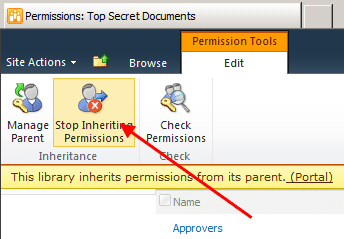
- Click on Stop Inheriting Permissions command from the ribbon
- Revoke permissions for all but few important groups (e.g. Portal Owners and Portal Members).
Please note: Steps 2. – 4- are optional but workflow is going to be much simpler if there are fewer permissions to manage - Open your site in SharePoint Designer, and select Workflows option and your list from the ribbon
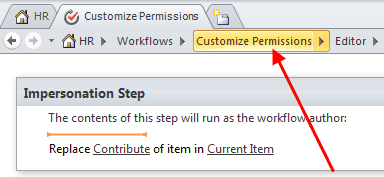
- Type the name for the new workflow (e.g. Customize Permissions)
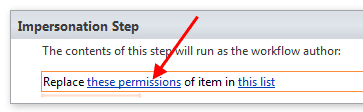
- Insert a new Impersonation Step. This special step runs each activity as workflow author.
Make sure workflow author (you) has proper privileges to manage permissions for this list.
- From the list of workflow actions choose “Replace Item Permissions
- Click Replace these permissions
- In the dialog click Add
- In the Choose permission to grant dialog click Contribute, and then click Choose… button
- Add User who created current item to the Selected users list
- Click the workflow name (e.g. “Customize Permissions”) to manage workflow settings
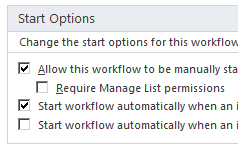
- Make sure you have selected the correct Start options
- Publish your workflow


You can also customize this workflow and add permissions for other users as well.
Monday, October 3, 2011
How to get the full URL from SPListItem in SharePoint
1. static string GetItemUrl(SPListItem listItem)
{
return string.Format("{0}{1}?ID={2}", listItem.Web.Site.Url, listItem.ParentList.Forms[PAGETYPE.PAGE_DISPLAYFORM].ServerRelativeUrl,listItem .ID);
}2. listItemlistItem3.foreach (SPListItem listItemin list.Items){XmlDocument xmlDoc = new XmlDocument();xmlDoc.LoadXml(listItem.Xml);XmlNamespaceManager nsm = new XmlNamespaceManager(xmlDoc.NameTable);nsm.AddNamespace("z", "#RowsetSchema");string fullURL = xmlDoc.SelectSingleNode("z:row", nsm).Attributes["ows_EncodedAbsUrl"].Value;} Monday, September 26, 2011
Welcome to the Fix it Solution Center(Microsoft Fixit)
Find automated solutions for your issues.
http://support.microsoft.com/fixit/

Thursday, September 22, 2011
Remove HTML tags from a string using C#
public static class RemoveHtmlFromString
{
    /// <summary>
    /// Remove HTML from string with Regex.
    /// </summary>
    public static string StripTagsRegex(string source)
    {
 return Regex.Replace(source, "<.*?>", string.Empty);
    }

    /// <summary>
    /// Compiled regular expression for performance.
    /// </summary>
    static Regex _htmlRegex = new Regex("<.*?>", RegexOptions.Compiled);

    /// <summary>
    /// Remove HTML from string with compiled Regex.
    /// </summary>
    public static string StripTagsRegexCompiled(string source)
    {
 return _htmlRegex.Replace(source, string.Empty);
    }

    /// <summary>
    /// Remove HTML tags from string using char array.
    /// </summary>
    public static string StripTagsCharArray(string source)
    {
 char[] array = new char[source.Length];
 int arrayIndex = 0;
 bool inside = false;

 for (int i = 0; i < source.Length; i++)
 {
     char let = source[i];
     if (let == '<')
     {
  inside = true;
  continue;
     }
     if (let == '>')
     {
  inside = false;
  continue;
     }
     if (!inside)
     {
  array[arrayIndex] = let;
  arrayIndex++;
     }
 }
 return new string(array, 0, arrayIndex);
    }
}What differ *.stp and *.wsp Windows Sharepoint Services files?
"A .stp (site template) file contains resources and a manifest file
relevant to an individual site template, and is limited in that it
only contains a site itself with lists, etc. SPS 2003 and WSS 2.0
used .stp files, and they can still be used in MOSS 2007 and WSS 3.0.
They are convenient, in large part because a relatively inexperienced
user can save a site to template through the UI, and create new sites
from that template with no knowledge of the .stp file's contents, etc.
A .wsp (solution) file similarly contains resources and a manifest
file, but is more broadly used for extending MOSS 2007 and WSS 3.0
(not applicable to SPS 2003 or WSS 2.0), and is generally used for
deploying Features, which can consist of site definitions, lists, web
parts, custom actions, fields, etc., etc. It is much more extensible
than the .stp framework, though it is also therefore more complicated
to use.
relevant to an individual site template, and is limited in that it
only contains a site itself with lists, etc. SPS 2003 and WSS 2.0
used .stp files, and they can still be used in MOSS 2007 and WSS 3.0.
They are convenient, in large part because a relatively inexperienced
user can save a site to template through the UI, and create new sites
from that template with no knowledge of the .stp file's contents, etc.
A .wsp (solution) file similarly contains resources and a manifest
file, but is more broadly used for extending MOSS 2007 and WSS 3.0
(not applicable to SPS 2003 or WSS 2.0), and is generally used for
deploying Features, which can consist of site definitions, lists, web
parts, custom actions, fields, etc., etc. It is much more extensible
than the .stp framework, though it is also therefore more complicated
to use.
Errors while installing and configuring Sharepoint 2010


The Problems!
When installing SharePoint 2010 on Windows 7, even if you install all of its prerequisites that it says to install, you get one of these two errors:
An exception of type System.IO.FileNotFoundException was thrown. Additional exception information: Could not load file or assembly ‘Microsoft.IdentityModel, Version 3.5.0.0, Culture=neutral, PublicKeyToken=31bf3856ad364e35′ or one of its dependencies. The system cannot find the file specified.
-OR-
An exception oftype Microsoft.SharePoint.Upgrade.SPUpgradeException was thrown. Additional exception information: Failed to call GetTypes on assembly Microsoft.Office.Server.Search, Version=14.0.0.0, Culture=neutral, PublicKeyToken=71e9bce111e9429c. Could not load file or assembly ‘System.Web.DataVisualition, Version=3.5.0.0, Culture=neutral, PublicKeyToken=31bf3856ad364e35’ or one of its dependencies. The system cannot find thefile specified.
-OR-
Failed to create the configuration database.
An exception of the type Microsoft.SharePoint.SPException was thrown. Additional exception information: User cannot be found
(See both possible solutions below)
Below are the steps that I took to get these errors.
Installed SQL Server 2008 R2, Installed SharePoint 2010 (with its prerequisites first).
Went to Start, SharePoint 2010 Central Administraton


Clicked Yes

Clicked Next

WARNING: you are installing on windows vista or windows 7, which are unsupported configurations intended for use on developer workstations only. This configuration should not be used as a production environment, or host any user content.
Clicked OK

Clicked Yes
You might get one of the errors below:

An exception of type System.IO.FileNotFoundException was thrown. Additional exception information: Could not load file or assembly ‘Microsoft.IdentityModel, Version 3.5.0.0, Culture=neutral, PublicKeyToken=31bf3856ad364e35′ or one of its dependencies. The system cannot find the file specified.
Click Finish.
The problem is that the Windows Identity Foundation pack was not installed. This can be fixed here: http://www.microsoft.com/downloads/details.aspx?FamilyID=eb9c345f-e830-40b8-a5fe-ae7a864c4d76&displaylang=en#filelist
-OR-

An exception oftype Microsoft.SharePoint.Upgrade.SPUpgradeException was thrown. Additional exception information: Failed to call GetTypes on assembly Microsoft.Office.Server.Search, Version=14.0.0.0, Culture=neutral, PublicKeyToken=71e9bce111e9429c. Could not load file or assembly ‘System.Web.DataVisualition, Version=3.5.0.0, Culture=neutral, PublicKeyToken=31bf3856ad364e35’ or one of its dependencies. The system cannot find thefile specified.
Click Finish.
The problem is that the Chart Controls cannot be found, you can download them here: http://go.microsoft.com/fwlink/?LinkID=122517
-OR-

Failed to create the configuration database.An exception of the type Microsoft.SharePoint.SPException was thrown. Additional exception information: User cannot be found
Alright, this one is rather funny. You can get this message if you are working from home, not connected to the network via VPN. That was my case. The user just cannot be found that is part of the domain for creating the SQL Server connection.
SUCCESS!!!
![clip_image002[1]](http://myspexp.files.wordpress.com/2010/06/clip_image00211.jpg "clip_image002[1]")
That all worked for me, hope it works for you!
Type of events for document library.
| Event | Description |
|---|---|
| Cancel Check Out | Changes made to a checked-out document are undone. |
| Check In | A document is checked in to the library. |
| Check Out | A document is checked out from the library. |
| Copy | A document in the library is copied. |
| Delete | A document is deleted from the library. |
| Insert | A new document is saved to the library. |
| Move or Rename | A document is moved or renamed. |
| Update | An existing document or the value of a custom column in the library is edited. |
Subscribe to:
Posts (Atom)
Featured Posts
OBS Browser Source Not Working? How to Interact With Web Pages Inside OBS Studio
If you're using OBS Studio to display a website, YouTube page, dashboard, live poll, chat widget, or web application, you may notice so...

-
public struct CoOrds { public int x, y; public CoOrds( int p1, int p2) { x = p1; y = p2; } }
-
LM Studio Overview LM Studio is a desktop application designed for developing and experimenting with large language models (LLMs)...
