
Cutefish OS 2026
The Beautiful Linux Desktop Is Back
A rebuilt Debian-based Linux experience with its own Wayland compositor, native C++ toolkit, Skia-powered graphics and a clean, Mac-inspired desktop.

Linux has another interesting desktop project to watch. Cutefish, formerly known as CutefishOS, has returned with a rebuilt desktop experience. The current project is based on Debian 13 and is developing its own compositor, graphics toolkit and system applications.
What is Cutefish?
Cutefish began in 2021 as CutefishOS, a Linux distribution recognised for its clean, macOS-inspired interface. The project has since been rebuilt under the name Cutefish. Its goal is to offer a desktop that feels familiar to people accustomed to Mac workflows while remaining a Linux distribution.
What makes the current effort notable is the scope of the rebuild: the desktop shell, compositor, toolkit and bundled applications are designed as parts of one integrated experience.
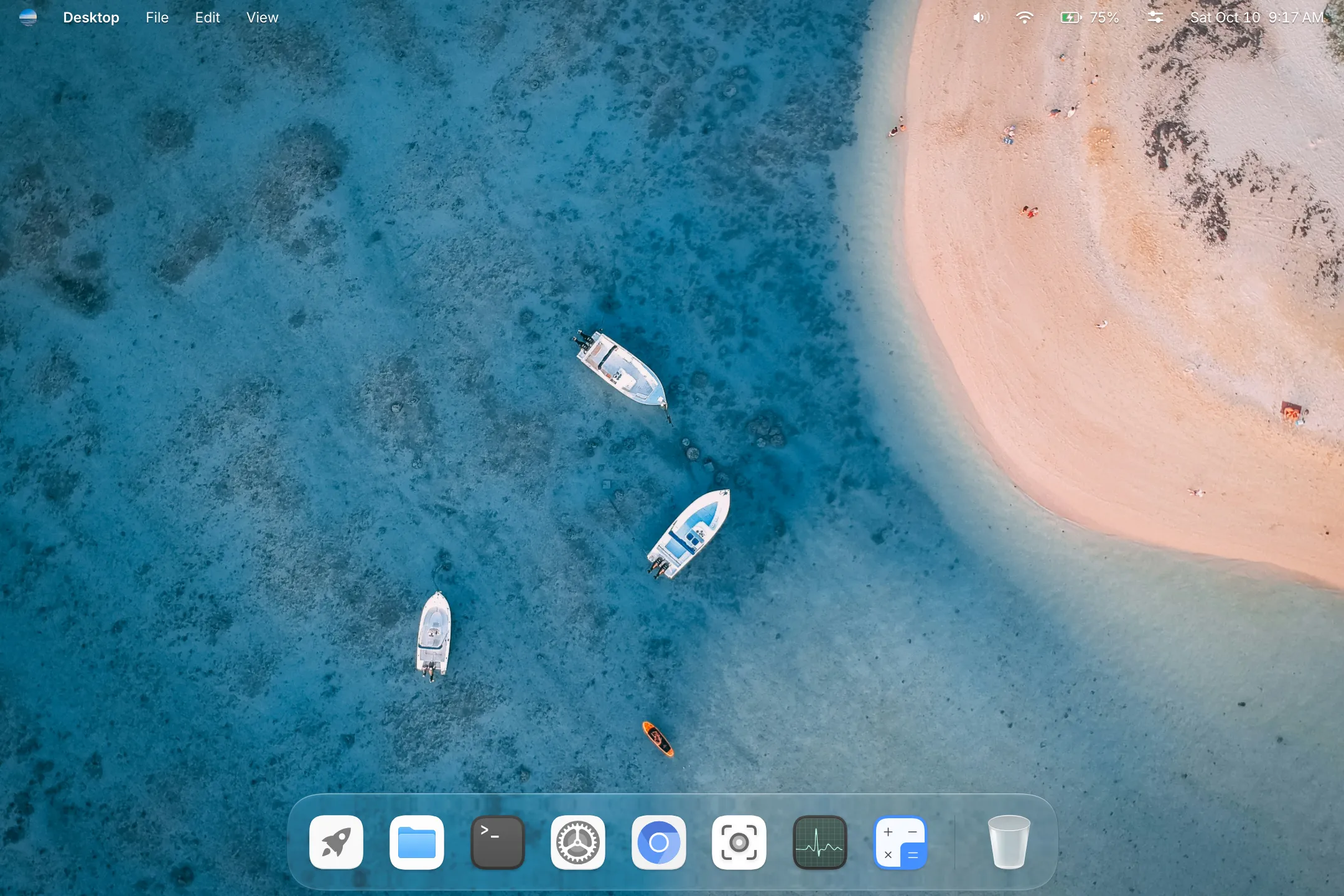
1. A clean, Mac-inspired desktop
The first thing you notice is the visual design. Cutefish uses a top menu bar, a centered Dock, an application launcher and a consistent set of interface elements. The aim is to make common desktop actions feel familiar without simply copying another operating system.
- Dock with icon magnification options.
- Application launcher with folders.
- Glass-style menus and panels.
- App menus integrated into the top menu bar.
- Window effects and workspace overview.
2. Its own Wayland compositor
Cutefish includes its own Wayland compositor, which draws the desktop shell and handles window effects and animations. Building this layer gives the project direct control over how its desktop behaves, rather than relying entirely on an existing desktop shell.
This is a substantial engineering undertaking. Compositor maturity, hardware support and compatibility with different applications will be important things to evaluate as the project develops.
3. Native C++ toolkit powered by Skia
The project also develops a native C++ UI toolkit that uses Skia for drawing. Skia is a 2D graphics library used by a number of well-known software projects. Cutefish uses its toolkit across the applications that ship with the desktop to create a consistent look and feel.
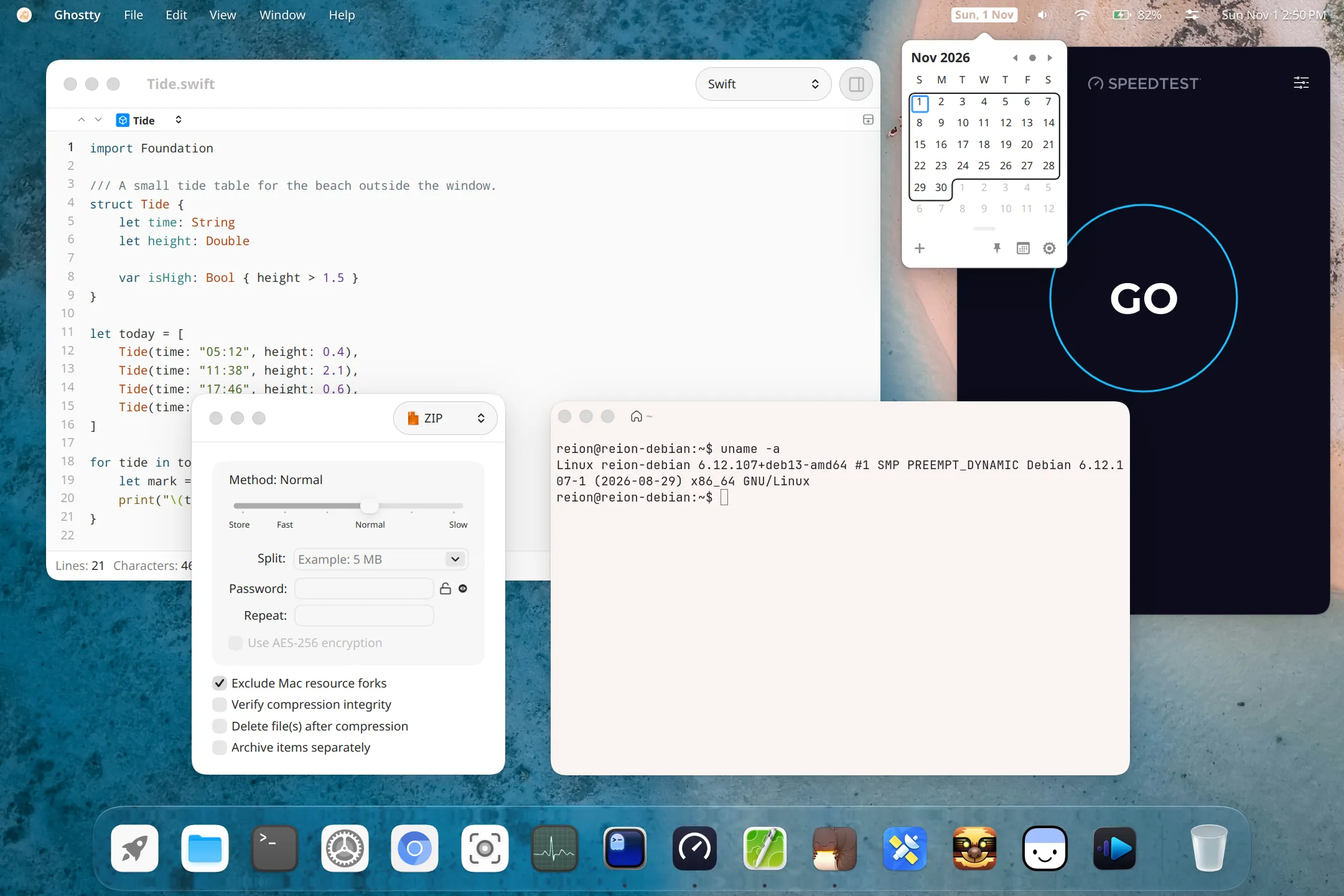
4. Built-in applications
The desktop includes a collection of everyday utilities built around the Cutefish toolkit.
File Manager
Browse folders and manage files from the desktop.
Terminal
Run shell commands and manage the Linux system.
System Settings
Configure appearance, language and desktop behaviour.
Calendar
View dates and manage calendar-related tasks.
System Monitor
Inspect system resource usage.
Preview
Open images and PDF documents.
Other included applications include Calculator, Text Editor, Video Player and Screenshot.
5. Recent desktop improvements
The project's November 2026 update describes several additions and refinements:
- Support for 17 languages across the desktop and bundled applications.
- A Preview application for images and PDF documents.
- A dedicated Software Update page in Settings.
- Its own installer with language, disk, account and time-zone setup.
- Dock magnification and launcher folders.
- A refreshed glass appearance for menus and panels.
6. AI agents and desktop control through MCP
Cutefish is exploring desktop interaction through the Model Context Protocol (MCP). Compatible agents can request permission to see the screen, click and type through the compositor. The project describes a consent prompt, a visible Stop control and automatic pausing when the user takes over the pointer or keyboard.
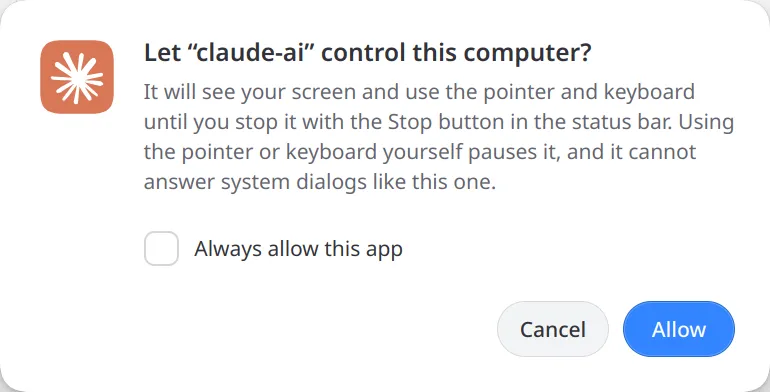
This is an early and evolving area. Users should review permissions carefully before allowing an agent to interact with their desktop.
7. Debian 13 foundation and architecture
Cutefish 1.0 nightly is based on Debian 13 and the project publishes images for amd64 and arm64. Debian's APT package ecosystem provides the underlying package-management foundation, while Cutefish supplies its own desktop packages.
| Specification | Details |
|---|---|
| Project | Cutefish (formerly CutefishOS) |
| Current build | 1.0 nightly |
| Base | Debian 13 |
| Display system | Wayland |
| Compositor | Custom Cutefish compositor |
| Toolkit | Native C++ toolkit with Skia |
| Architectures | amd64 and arm64 |
| Package management | APT |
| Release status | Nightly development builds |
8. Performance: what does the project claim?
The official website reports less than 1 GB of memory use immediately after login and approximately 0.1 seconds from a click to a window appearing in bundled applications. These are developer-reported measurements taken on a 2021 laptop with integrated graphics and a 2160 × 1440 display. They are not independent benchmark results, and real-world performance will vary with hardware, resolution and workload.
9. Is Cutefish ready for daily use?
Not yet as a general recommendation. The official download page labels the available images as nightly builds and says that no official release is available yet. Nightly builds can contain bugs, incomplete features or regressions.
For now, Cutefish is best approached as an interesting project for Linux enthusiasts, developers and reviewers. Test it in a virtual machine or on spare hardware before considering installation on a primary computer.
10. Download and official resources
You can find the current nightly images and Debian 13 APT repository on the official download site. The project also provides instructions for checking the ISO checksum and build provenance. Verify the downloaded image before using it.
Final verdict
Cutefish is interesting for more than its attractive, Mac-inspired interface. The rebuilt project is developing its own compositor, native graphics toolkit and bundled applications, while exploring permission-based AI interaction with the desktop.
It is still early, and the nightly status matters. But for anyone interested in Linux desktop engineering and open-source experimentation, Cutefish is a project worth following.
Would you try a Linux desktop designed around Mac-like workflows? Share your thoughts in the comments.
Official sources and further reading
- Cutefish official website
- About Cutefish and its architecture
- What's new in Cutefish – November 2026
- Official nightly downloads and verification
- Cutefish on GitHub
Specifications and release status are described as of November 20, 2026. Check the official project pages for changes after publication. Product names and trademarks belong to their respective owners. Cutefish is an independent project and is not affiliated with or endorsed by Apple.


No comments:
Post a Comment
Thank you for Commenting Will reply soon ......